Add_one

Tuesday, June 19, 2018

Cryptography and Microsoft Tools

CRYPTOGRAPHY


Cryptography is associated with the process of converting ordinary plain text into unintelligible text and vice-versa. It is a method of storing and transmitting data in a particular form so that only those for whom it is intended can read and process it. Cryptography not only protects data from theft or alteration but can also be used for user authentication.
Simply says, Cryptography is the science of using mathematics to encrypt and decrypt data.

Nowadays, Cryptography is mainly based on mathematical theory and computer science practice -

Modern cryptography concerns with -
1. Confidentiality - Information cannot be understood by anyone

2. Integrity - Information cannot be altered.

3. Non-repudiation - Sender cannot deny his/her intentions in the transmission of the 
information at a later stage

4. Authentication - Sender and receiver can confirm each


This is the basic flow of cryptography -


Note - While cryptography is the science of securing data, cryptanalysis is the science of analyzing and breaking secure communication. Cryptology embraces both cryptography and cryptanalysis.

Types of Cryptography -

Three types of cryptographic techniques used in general.

1. Symmetric-key cryptography (SKC)

2. Public-key cryptography (PKC)

3. Hash functions.

Symmetric-key Cryptography: Both the sender and receiver share a single key. The sender uses this key to encrypt plaintext and send the ciphertext to the receiver. On the other side, the receiver applies the same key to decrypt the message and recover the plain text.

Public-Key Cryptography: This is the most revolutionary concept in the last 300-400 years. In Public-Key Cryptography two related keys (public and private key) are used. The public key may be freely distributed, while its paired private key, remains a secret. The public key is used for encryption and for decryption private key is used.

Hash Functions: No key is used in this algorithm. A fixed-length hash value is computed as per the plain text that makes it impossible for the contents of the plaintext to be recovered. Hash functions are also used by many operating systems to encrypt passwords.

Encryption Algorithms

MD5– this is the acronym for Message-Digest 5. It is used to create 128-bit hash values. Theoretically, hashes cannot be reversed into the original plain text. MD5 is used to encrypt passwords as well as check data integrity.  MD5 is not collision resistant. Collision resistance is the difficulties in finding two values that produce the same hash values.
  • SHA– this is the acronym for Secure Hash Algorithm. SHA algorithms are used to generate condensed representations of a message (message digest). It has various versions such as;
  • SHA-0:  produces 120-bit hash values. It was withdrawn from use due to significant flaws and replaced by SHA-1.
  • SHA-1:  produces 160-bit hash values. It is similar to earlier versions of MD5. It has cryptographic weakness and is not recommended for use since the year 2010.
  • SHA-2:  it has two hash functions namely SHA-256 and SHA-512. SHA-256 uses 32-bit words while SHA-512 uses 64-bit words.
  • SHA-3: this algorithm was formally known as Keccak.
  • RC4– this algorithm is used to create stream ciphers. It is mostly used in protocols such as Secure Socket Layer (SSL) to encrypt internet communication and Wired Equivalent Privacy (WEP) to secure wireless networks.
  • BLOWFISH– this algorithm is used to create keyed, symmetrically blocked ciphers. It can be used to encrypt passwords and other data.

Hacking Activity: Use CrypTool

In this practical scenario, we will create a simple cipher using the RC4 algorithm. We will then attempt to decrypt it using brute-force attack. For this exercise, let us assume that we know the encryption secret key is 24 bits. We will use this information to break the cipher.
We will use CrypTool 1 as our cryptology tool. CrypTool 1 is an open source educational tool for cryptological studies. You can download it from https://www.cryptool.org/en/ct1-downloads

Microsoft Cryptography Tools

The publishing tools and the signing DLL are installed in the \Bin directory of your Microsoft SDK installation. They include the following files.
FilenameRemarks
Cert2SPC.exe
Creates a Software Publisher Certificate (SPC) for testing purposes only.
CertMgr.exe
Manages certificates, CTLs, and certificate revocation lists (CRLs).
MakeCat.exe
Creates an unsigned catalog file that contains the hashes of a set of files along with associated attributes of each file.
MakeCert.exe
Creates an X.509 certificate for testing purposes only.
Pvk2pfx.exe
Converts a software publisher certificate file (.spc) or a private key file (.pvk) to Personal Information Exchange (PFX) file format.
SetReg.exe
Sets registry keys that control certificate verification.
SignTool.exe
Signs and time stamps a file. Additionally, checks the signature of a file.
Uses - Cryptography is used in many applications like banking transactions cards, computer passwords, and e-commerce transactions.

Friday, June 15, 2018

Footprinting - Tools and Methods

FOOTPRINTING


Footprinting is a part of reconnaissance process which is used for gathering possible information about a target computer system or network. Footprinting could be both passive and active
Footprinting is a first and the important step because after this a penetration tester knows how the hacker sees this network.

To measure the security of a computer system, it is good to know more and more as you can because after this you will able to determine the path that a hacker will use to exploit this network. 
Here is Scenario of the Footprinting - 


 The EC-Council divides footprinting and scanning into seven basic steps. These include

1. Information gathering
2. Determining the network range
3. Identifying active machines
4. Finding open ports and access points
5. OS fingerprinting
6. Fingerprinting services
7. Mapping the network
Information gathering means to find these:
Internet: Domain name, network blocks, IP addresses open to Net, TCP and UDP services running, ACLs, IDSes
Intranet: Protocols (IP,NETBIOS), internal domain names, etc
Remote Access: Phone numbers, remote control, telnet, authentication Extranet: Connection origination, destination, type, access control  
Website on an organisation is a first place from where penetration testing start, you can get the sensitive information about the network by using websites, you can get Phone Numbers, Contact Names, E-mail Addresses, and Personal Details. Beside the official website of the company an attacker might be use some social networking website like facebook to gather the appropriate information. Some other resources and a website that an attacker may use to get the maximum information about the organisation and it employees are:

zabasearch.com—Contains names, addresses, phone numbers, date of birth, and other information about individuals.
anywho.com—Phone book offering forward and reverse lookups.
maps.yahoo.com—Yahoo! map site. 
You can use the facility of a search engine to perform footprinting,search engine like google, yahoo or altavista provide the plate form to gather the information. Advance google dorks may be use to get the information like:
Filetype: This operator directs Google to search only within the test of a particular type of file.
        Example: filetype:xls

Inurl: This operator directs Google to search only within the specified URL of a document.
     Example: inurl:search-text

Link: The link operator directs Google to search within hyperlinks for a specific term.
    Example link:www.domain.com

Intitle: The intitle operator directs Google to search for a term within the title of a document.
       Example intitle: “Index of...etc”
Footprinting helps to -
1. Know Security Posture – The data gathered will help us to get an overview of the security posture of the company such as details about the presence of a firewall, security configurations of applications etc.
2. Reduce Attack Area – Can identify a specific range of systems and concentrate on particular targets only. This will greatly reduce the number of systems we are focussing on.
3. Identify vulnerabilities – we can build an information database containing the vulnerabilities, threats, loopholes available in the system of the target organization.
4. Draw Network map – helps to draw a network map of the networks in the target organization covering topology, trusted routers, presence of server and other information.

Thursday, June 14, 2018

Sniffing - Tools and Precautions

Sniffing

What is Sniffing?
Sniffing is the process of monitoring and capturing all the packets passing through a given network using sniffing tools. It is a form of “tapping phone wires” and get to know about the conversation. It is also called wiretapping applied to the computer networks.


There is so much possibility that if a set of enterprise switch ports is open, then one of their employees can sniff the whole traffic of the network. Anyone in the same physical location can plug into the network using Ethernet cable or connect wirelessly to that network and sniff the total traffic.

What can be sniffed?

One can sniff the following sensitive information from a network −
  • Email traffic
  • FTP passwords
  • Web traffics
  • Telnet passwords
  • Router configuration
  • Chat sessions
  • DNS traffic

How it works

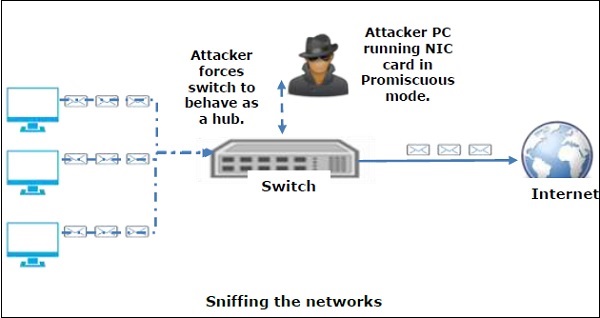
A sniffer normally turns the NIC of the system to the promiscuous mode so that it listens to all the data transmitted on its segment.
Promiscuous mode refers to the unique way of Ethernet hardware, in particular, network interface cards (NICs), that allows an NIC to receive all traffic on the network, even if it is not addressed to this NIC. By default, a NIC ignores all traffic that is not addressed to it, which is done by comparing the destination address of the Ethernet packet with the hardware address (a.k.a. MAC) of the device. While this makes perfect sense for networking, non-promiscuous mode makes it difficult to use network monitoring and analysis software for diagnosing connectivity issues or traffic accounting.

Sniffing Networks

A sniffer can continuously monitor all the traffic to a computer through the NIC by decoding the information encapsulated in the data packets.

Sniffing is of 2 types  - 
1. Active Sniffing -
    In active sniffing, the traffic is not only locked and monitored, but it may also be altered in some wayas determined by the attack. Active sniffing is used to sniff a switch-based network.

2. Passive Sniffing -
  In passive sniffing, the traffic is locked but it is not altered in any way. Passive sniffing allows listeningonly. It works with Hub devices.

Tools Used for Sniffing -  There are so many tools available to perform sniffing over a network, and they all have their own features to help a hacker analyze traffic and dissect the information. Sniffing tools are extremely common applications. We have listed here some of the interesting ones −
  • BetterCAP − BetterCAP is a powerful, flexible and portable tool created to perform various types of MITM attacks against a network, manipulate HTTP, HTTPS and TCP traffic in real-time, sniff for credentials, and much more.
  • Ettercap − Ettercap is a comprehensive suite for man-in-the-middle attacks. It features sniffing of live connections, content filtering on the fly and many other interesting tricks. It supports active and passive dissection of many protocols and includes many features for network and host analysis.
  • Wireshark − It is one of the most widely known and used packet sniffers. It offers a tremendous number of features designed to assist in the dissection and analysis of traffic.
  • Tcpdump − It is a well-known command-line packet analyzer. It provides the ability to intercept and observe TCP/IP and other packets during transmission over the network. Available at www.tcpdump.org.
  • WinDump − A Windows port of the popular Linux packet sniffer tcpdump, which is a command-line tool that is perfect for displaying header information.
  • OmniPeek − Manufactured by WildPackets, OmniPeek is a commercial product that is the evolution of the product EtherPeek.
  • Dsniff − A suite of tools designed to perform sniffing with different protocols with the intent of intercepting and revealing passwords. Dsniff is designed for Unix and Linux platforms and does not have a full equivalent on the Windows platform.
  • EtherApe − It is a Linux/Unix tool designed to display graphically a system's incoming and outgoing connections.
  • MSN Sniffer − It is a sniffing utility specifically designed for sniffing traffic generated by the MSN Messenger application.
  • NetWitness NextGen − It includes a hardware-based sniffer, along with other features, designed to monitor and analyze all traffic on a network. This tool is used by the FBI and other law enforcement agencies.

Wednesday, June 13, 2018

Penetration Testing - Methods and Tools

Penetration Testing

A penetration test, also known as a pen test, is a simulated cyber attack against your computer system to check for exploitable vulnerabilities. In the context of web application security, penetration testing is commonly used to augment a web application firewall (WAF).

Note - Insights provided by the penetration test can be used to fine-tune your WAF security policies and patch detected vulnerabilities.

Penetration Testing Stages

The penetration testing process has five stages as -
Five Stages of Penetration Testing


Penetration Testing Methods

1. External testing

External penetration tests target the assets of a company that is visible on the internet, e.g. the web application itself, the company website, and email and domain name servers (DNS). The goal is to gain access and extract valuable data.

2. Internal testing

In an internal test, a tester with access to an application behind its firewall simulates an attack by a malicious insider. This isn’t necessarily simulating a rogue employee. A common starting scenario can be an employee whose credentials were stolen due to a phishing attack.

3. Blind testing

In a blind test, a tester is only given the name of the enterprise that’s being targeted. This gives security personnel a real-time look into how an actual application assault would take place.

4. Double-blind testing

In a double-blind test, security personnel has no prior knowledge of the simulated attack. As in the real world, they won’t have any time to shore up their defenses before an attempted breach.

5. Targeted testing

In this scenario, both the tester and security personnel work together and keep each other appraised of their movements. This is a valuable training exercise that provides a security team with real-time feedback from a hacker’s point of view.

What is Penetration Testing Tools?

The following table collects some of the most significant penetration tools and illustrates their features −


Tool Name Purpose Portability Expected Cost
Hping Port Scanning
Remote OC fingerprinting
Linux, NetBSD,
FreeBSD,
OpenBSD,
     Free
Nmap Network Scanning
Port Scanning
OS Detection
Linux, Windows, FreeBSD, OS X, HP-UX, NetBSD, Sun, OpenBSD, Solaris, IRIX, Mac, etc.     Free
SuperScan Runs queries including ping, whois, hostname lookups, etc.
Detects open UDP/TCP ports and determines which services are running on those ports.
Windows 2000/XP/Vista/7     Free
p0f Os fingerprinting
Firewall detection
Linux, FreeBSD, NetBSD, OpenBSD, Mac OS X, Solaris, Windows, and AIX     Free
Xprobe Remote active OS fingerprinting
Port Scanning
TCP fingerprinting
Linux     Free
Httprint Web server fingerprinting SSL detection
Detect web-enabled devices (e.g., wireless access points, switches, modems, routers)
Linux, Mac OS X, FreeBSD, Win32 (command line & GUI     Free
Nessus Detect vulnerabilities that allow the remote cracker to control/access sensitive data Mac OS X, Linux, FreeBSD, Apple, Oracle Solaris, Windows     Free to limited    
GFI LANguard Detect network vulnerabilities Windows Server 2003/2008, Windows 7 Ultimate/ Vista, Windows 2000 Professional, Business/XP, Sever 2000/2003/2008    Only Trial
Iss Scanner Detect network vulnerabilities Windows 2000 Professional with SP4, Windows Server 2003 Standard with SO1, Windows XP Professional with SP1a    Only Trial
Shadow Security Scanner Detect network vulnerabilities, audit proxy and LDAP servers Windows but scan servers built on any platform    Only Trial
Metasploit Framework Develop and execute exploit code against a remote target
Test vulnerability of computer systems
All versions of Unix and Windows    Free
Brutus Telnet, FTP, and HTTP password cracker Windows 9x/NT/2000    Free


For Practical tutorials Videos will be Uploaded Soon on Our Youtube Channel...Stay Tune

Tuesday, June 12, 2018

Attack! Ethical Hacking

Introduction to Ethical Hacking

An Ethical Hacker (also known as a white hat hacker) is the ultimate security professional. Ethical hackers know how to find and exploit vulnerabilities and weaknesses in various systems. In fact, they use the same skills; however, an ethical hacker uses those skills in a legitimate, lawful manner to try to find vulnerabilities and fix them before the bad guys can get there and try to break in.
An ethical hacker’s role is similar to that of a penetration tester, but it involves broader duties. They break into systems legally and ethically. This is the primary difference between ethical hackers and real hackers—the legality means Law.
Hackers are varied creatures and include these 7 types:
SymbolDescription
What is Hacking ? An IntroductionEthical Hacker (White hat): A hacker who gains access to systems with a view to fixing the identified weaknesses. They may also perform penetration Testing and vulnerability assessments.
What is Hacking ? An IntroductionCracker (Blackhat): A hacker who gains unauthorized access to computer systems for personal gain. The intent is usually to steal corporate data, violate privacy rights, transfer funds from bank accounts etc.
What is Hacking ? An IntroductionGrey hat: A hacker who is in between ethical and black hat hackers. He/she breaks into computer systems without authority with a view to identify weaknesses and reveal them to the system owner.
What is Hacking ? An IntroductionScript kiddies: A non-skilled person who gains access to computer systems using already made tools.
What is Hacking ? An IntroductionHacktivist: A hacker who use hacking to send social, religious, and political, etc. messages. This is usually done by hijacking websites and leaving the message on the hijacked website.
What is Hacking ? An IntroductionPhreaker: A hacker who identifies and exploits weaknesses in telephones instead of computers.

Why Ethical Hacking?

  • Information is one of the most valuable assets of an organization. Keeping information secure can protect an organization’s image and save an organization a lot of money.
  • Hacking can lead to loss of business for organizations that deal in finance such as PayPal. Ethical hacking puts them a step ahead of the cybercriminals who would otherwise lead to loss of business.

Summary

  • Hacking is identifying and exploiting weaknesses in computer systems and/or computer networks.
  • Cybercrime is committing a crime with the aid of computers and information technology infrastructure.
  • Ethical Hacking is about improving the security of computer systems and/or computer networks.
  • Ethical Hacking is legal.

News! New Hacking Tools - 2018 - Target Exploits and Vulnerabilities Easily

New Hacking Tools - 2018 With Increase in Technology, Increase the demand for Cyber Security and it is also essential to develop the ...